지난 1월부터 가시다님이 운영하시는 쿠버네티스 스터디에 참여하게 되었는데, 스터디 3주차의 내용은 쿠버네티스 스토리지, 인그레스에 대해 실습을 통해 알아보는 것이다.
과제 1: Ingress에 Path 설정 및 SSL 적용
첫번째 과제는 Ingress를 생성해 /mario 경로로 접속 시 마리오 게임에 접속하게 하고, /tetris 경로로 접속 시 테트리스 게임에 접속하도록 설정한 뒤, SSL을 적용하는 것이다.
다만, 나는 이번 스터디에서 ExternalDNS가 아닌 GossipDNS를 활용했기 때문에 ACM 생성 및 ALB와 ACM의 연동 절차는 생략하였다.
사전 작업
AWS Load Balancer Controller를 활용하기 위해 IAM role에 AWSLoadBalancerControllerIAMPolicy를 추가해주고, Instance profiles에 정책을 연결해준다.
다음으로는 지난 시간에 Service 리소스로 NLB를 생성했던 때와 마찬가지로, kOps 클러스터를 배포한 상태에서 kops edit 명령어를 통해 AWS Load Balancer Controller를 활성화 한다.
kops edit clusterspec:
certManager:
enabled: true
awsLoadBalancerController:
enabled: trueGossip DNS를 사용해서 클러스터를 생성한 경우 아래 옵션값은 추가하지 않는다(외부 DNS로 kOps 클러스터를 생성했을 경우 사용).
  externalDns:
    provider: external-dns
kOps 클러스터 변경사항을 적용해준다.
(canary:N/A) [root@kops-ec2 ~]# kops update cluster --yes && echo && sleep 3 && kops rolling-update cluster

*********************************************************************************

A new kubernetes version is available: 1.24.10
Upgrading is recommended (try kops upgrade cluster)

More information: https://github.com/kubernetes/kops/blob/master/permalinks/upgrade_k8s.md#1.24.10

*********************************************************************************

W0204 20:21:31.394214    7588 builder.go:231] failed to digest image "602401143452.dkr.ecr.us-west-2.amazonaws.com/amazon-k8s-cni-init:v1.11.4"
W0204 20:21:31.877535    7588 builder.go:231] failed to digest image "602401143452.dkr.ecr.us-west-2.amazonaws.com/amazon-k8s-cni:v1.11.4"
I0204 20:21:36.233530    7588 executor.go:111] Tasks: 0 done / 111 total; 49 can run
I0204 20:21:37.003428    7588 executor.go:111] Tasks: 49 done / 111 total; 19 can run
I0204 20:21:37.969552    7588 executor.go:111] Tasks: 68 done / 111 total; 28 can run
I0204 20:21:38.183666    7588 executor.go:111] Tasks: 96 done / 111 total; 3 can run
I0204 20:21:38.330060    7588 executor.go:111] Tasks: 99 done / 111 total; 6 can run
I0204 20:21:38.612129    7588 executor.go:111] Tasks: 105 done / 111 total; 3 can run
I0204 20:21:38.811242    7588 executor.go:111] Tasks: 108 done / 111 total; 3 can run
I0204 20:21:38.901461    7588 executor.go:111] Tasks: 111 done / 111 total; 0 can run
I0204 20:21:38.961827    7588 update_cluster.go:326] Exporting kubeconfig for cluster
kOps has set your kubectl context to canary.k8s.local
W0204 20:21:39.072357    7588 update_cluster.go:350] Exported kubeconfig with no user authentication; use --admin, --user or --auth-plugin flags with `kops export kubeconfig`

Cluster changes have been applied to the cloud.

Changes may require instances to restart: kops rolling-update cluster

NAME            STATUS    NEEDUPDATE    READY    MIN    TARGET    MAX    NODES
master-ap-northeast-2a    Ready    0        1    1    1    1    1
nodes-ap-northeast-2a    Ready    0        1    1    1    1    1
nodes-ap-northeast-2c    Ready    0        0    0    0    0    0

No rolling-update required.
MSA 샘플 애플리케이션 (12종) 링크를 참고해 마리오 앱과 테트리스 앱을 배포해보자.
먼저 게임 앱들이 배포될 네임스페이스를 생성한 뒤, 네임스페이스를 생성한 네임스페이스로 변경해준다.
(canary:N/A) [root@kops-ec2 ~]# k create ns games
namespace/games created
(canary:N/A) [root@kops-ec2 ~]# k ns games
Context "canary.k8s.local" modified.
Active namespace is "games".
마리오 및 테트리스 앱을 생성(Pod & Service)하는데 사용할 YAML파일을 생성한다.
cat <<EOF > mario.yaml
apiVersion: apps/v1
kind: Deployment
metadata:
  name: mario
  namespace: games
  labels:
    app: mario
spec:
  replicas: 1
  selector:
    matchLabels:
      app: mario
  template:
    metadata:
      labels:
        app: mario
    spec:
      containers:
      - name: mario
        image: pengbai/docker-supermario
---
apiVersion: v1
kind: Service
metadata:
  name: mario
  namespace: games
  annotations:
    alb.ingress.kubernetes.io/healthcheck-path: /mario/index.html
spec:
  selector:
    app: mario
  ports:
  - port: 80
    protocol: TCP
    targetPort: 8080
  type: NodePort
  externalTrafficPolicy: Local
EOF
cat <<EOF > tetris.yaml
apiVersion: apps/v1
kind: Deployment
metadata:
name: tetris
namespace: games
labels:
app: tetris
spec:
replicas: 1
selector:
matchLabels:
app: tetris
template:
metadata:
labels:
app: tetris
spec:
containers:
- name: tetris
image: bsord/tetris
---
apiVersion: v1
kind: Service
metadata:
name: tetris
namespace: games
annotations:
alb.ingress.kubernetes.io/healthcheck-path: /tetris/index.html
spec:
selector:
app: tetris
ports:
- port: 80
protocol: TCP
targetPort: 80
type: NodePort
EOF두 앱을 노출할 Ingress의 YAML 파일도 작성해준다.
cat <<EOF > ingress-games.yaml
apiVersion: networking.k8s.io/v1
kind: Ingress
metadata:
  namespace: games
  name: ingress-games
  annotations:
    alb.ingress.kubernetes.io/scheme: internet-facing
    alb.ingress.kubernetes.io/target-type: ip
    alb.ingress.kubernetes.io/healthcheck-protocol: HTTP
    alb.ingress.kubernetes.io/healthcheck-port: traffic-port
    alb.ingress.kubernetes.io/healthcheck-interval-seconds: '15'
    alb.ingress.kubernetes.io/healthcheck-timeout-seconds: '5'
    alb.ingress.kubernetes.io/success-codes: '200'
    alb.ingress.kubernetes.io/healthy-threshold-count: '2'
    alb.ingress.kubernetes.io/unhealthy-threshold-count: '2'
spec:
  ingressClassName: alb
  rules:
    - http:
        paths:
        - path: /tetris
          pathType: Prefix
          backend:
            service:
              name: tetris
              port:
                number: 80
        - path: /mario
          pathType: Prefix
          backend:
            service:
              name: mario
              port:
                number: 80
EOF
위에서 생성한 파일을 사용해 쿠버네티스 리소스를 생성한다.
kubectl apply -f mario.yaml
kubectl apply -f tetris.yaml
kubectl apply -f ingress-games.yaml
리소스들이 잘 생성되었는지 확인한다.
(canary:games) [root@kops-ec2 ~]# k get deploy,svc,ingress
NAME                     READY   UP-TO-DATE   AVAILABLE   AGE
deployment.apps/mario    1/1     1            1           3m27s
deployment.apps/tetris   1/1     1            1           83s

NAME             TYPE       CLUSTER-IP       EXTERNAL-IP   PORT(S)        AGE
service/mario    NodePort   100.65.250.149   <none>        80:31390/TCP   99s
service/tetris   NodePort   100.71.182.7     <none>        80:30888/TCP   83s

NAME                                      CLASS   HOSTS   ADDRESS                                                                     PORTS   AGE
ingress.networking.k8s.io/ingress-games   alb     *       k8s-games-ingressg-ef897ed3de-1461470066.ap-northeast-2.elb.amazonaws.com   80      19s
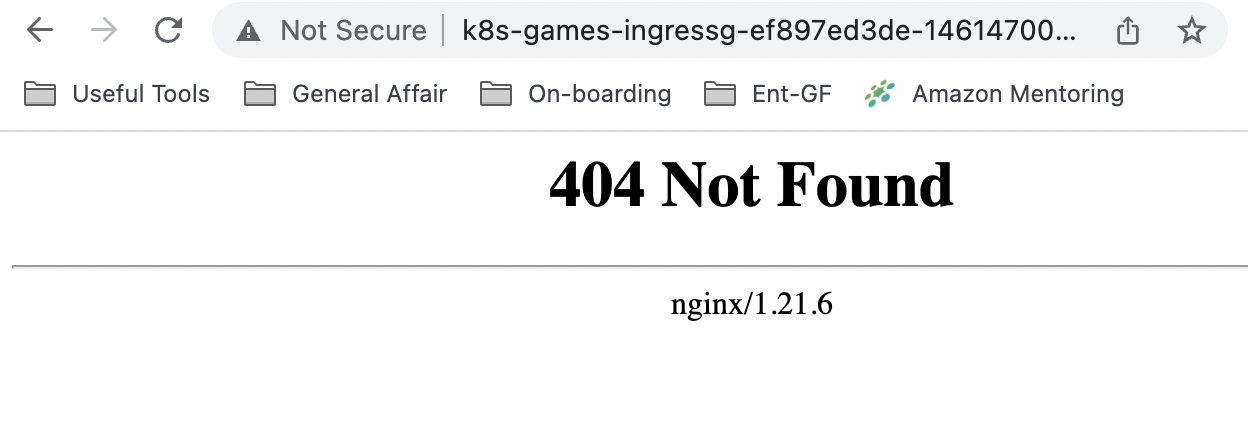
하지만 앱에 접속했을 때 404 에러가 발생해 스터디 멤버 분의 블로그를 참고해 각 게임 파드의 파일 경로를 변경해주었다
# mario 컨테이너로 접속
k exec -it mario-687bcfc9cc-tzxgh -- /bin/bash

# mario 폴더 생성
mkdir -p /usr/local/tomcat/webapps/ROOT
mkdir /usr/local/tomcat/webapps/ROOT/mario

# ROOT 밑에 있는 Context를 /Mario 밑으로 이동
mv /usr/local/tomcat/webapps/ROOT/* /usr/local/tomcat/webapps/ROOT/mario
# tetris 컨테이너로 접속
k exec -it tetris-7f86b95884-hhll8 -- /bin/bash
# tetris 폴더 생성
mkdir -p /usr/share/nginx/html/tetris
# HTML 밑에 있는 Context를 /tetris 밑으로 이동
mv /usr/share/nginx/html/* /usr/share/nginx/html/tetris파일 경로 변경 시 아래와 같은 에러 메시지가 발생하나, 이번 실습에서는 무시하고 진행해도 무방했다.
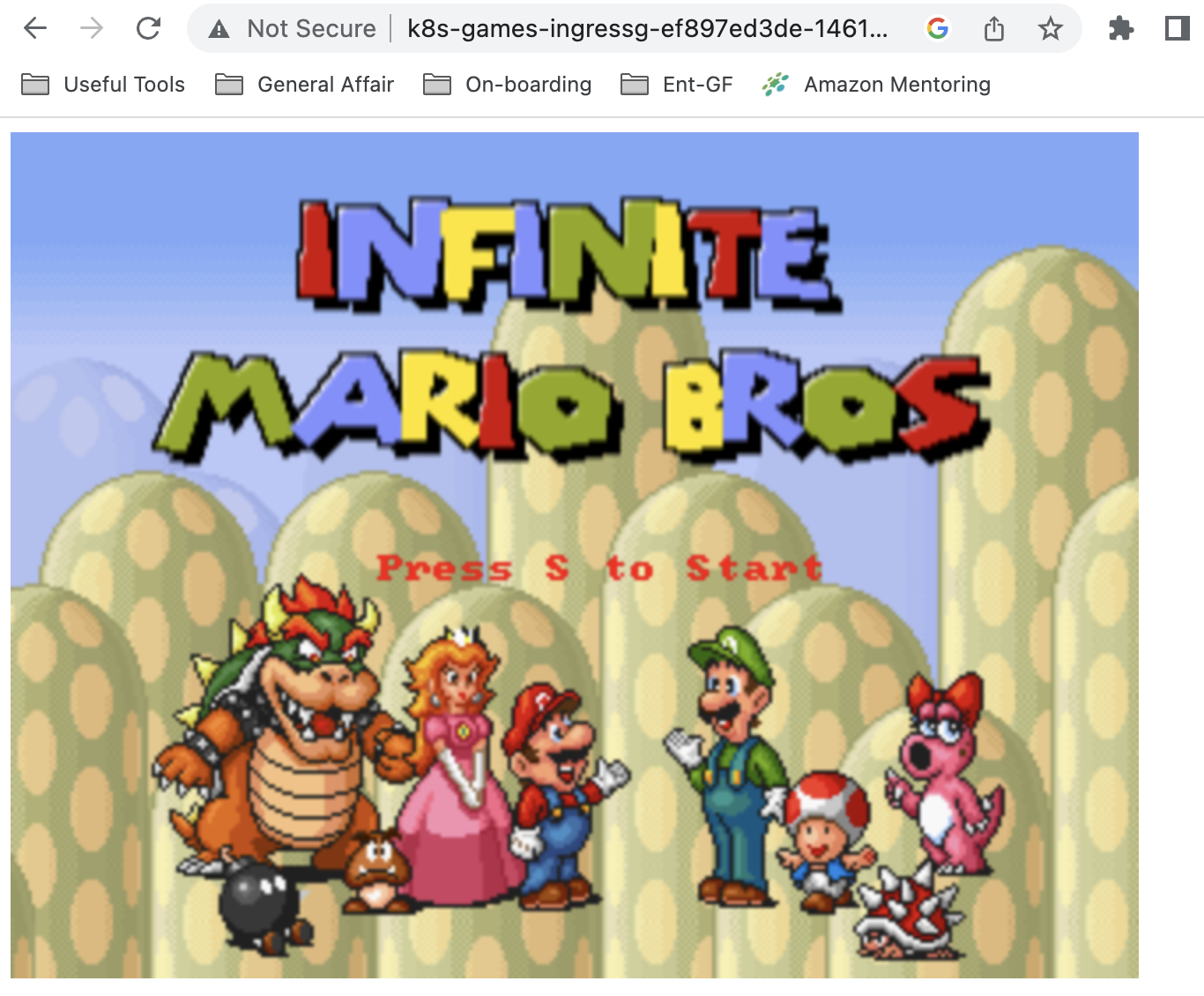
mv: cannot move '/usr/local/tomcat/webapps/ROOT/mario' to a subdirectory of itself, '/usr/local/tomcat/webapps/ROOT/mario/mario'다시 앱에 접속해 각 게임 앱에 접속이 되는지 확인한다.

과제 2: hostpath(local-path-provisioner) 실습 및 문제점 확인, 성능 측정
파드가 배포된 워커노드에 장애유지 보수가 필요한 상황으로 가정하고, 해당 노드에 drain 설정을 진행해보자.
(canary:N/A) [root@kops-ec2 ~]# kubectl drain $PODNODE --force --ignore-daemonsets --delete-emptydir-data && kubectl get pod -w
node/i-02b0d67c3ac9d4fda cordoned
Warning: ignoring DaemonSet-managed Pods: kube-system/aws-node-6gbzx, kube-system/ebs-csi-node-7l6bl
evicting pod kube-system/coredns-6b5bc459c-kw9br
evicting pod default/date-pod-d95d6b8f-gmfh9
pod/date-pod-d95d6b8f-gmfh9 evicted
pod/coredns-6b5bc459c-kw9br evicted
node/i-02b0d67c3ac9d4fda drained
NAME                      READY   STATUS    RESTARTS   AGE
date-pod-d95d6b8f-kv4wf   0/1     Pending   0          6s
Every 2.0s: kubectl get pod,pv,pvc -o wide Sun Feb 5 01:16:53 2023
NAME READY STATUS RESTARTS AGE IP NODE NOMINATED NODE READINESS GATES
pod/date-pod-d95d6b8f-kv4wf 0/1 Pending 0 20s <none> <none> <none> <none>
NAME CAPACITY ACCESS MODES RECLAIM POLICY STATUS CLAIM
STORAGECLASS REASON AGE VOLUMEMODE
persistentvolume/pvc-4ba862d9-95d4-41df-9f0e-cfb8f0a6bebc 2Gi RWO Delete Bound default/localp
ath-claim local-path 73s Filesystem
NAME STATUS VOLUME CAPACITY ACCESS MODES STORAGEC
LASS AGE VOLUMEMODE
persistentvolumeclaim/localpath-claim Bound pvc-4ba862d9-95d4-41df-9f0e-cfb8f0a6bebc 2Gi RWO local-pa
th 81s Filesystem노드를 확인해보면, 파드가 스케줄링 되었던 노드에 SchedulingDisabled 상태가 추가된 것을 알 수 있다.
(canary:N/A) [root@kops-ec2 ~]# kubectl get node
NAME                  STATUS                     ROLES           AGE   VERSION
i-01286e5d684031d9b   Ready                      control-plane   27m   v1.24.9
i-02b0d67c3ac9d4fda   Ready,SchedulingDisabled   node            26m   v1.24.9
i-045327ae33e89b75d   Ready                      node            26m   v1.24.9
Deployment 및 Pod 이벤트를 확인해보면, 스케줄링 할 수 있는 노드가 없어 Pod가 Pending된 것을 확인할 수 있다.
(canary:N/A) [root@kops-ec2 ~]# kubectl get deploy/date-pod
NAME       READY   UP-TO-DATE   AVAILABLE   AGE
date-pod   0/1     1            0           2m3s
(canary:N/A) [root@kops-ec2 ~]# kubectl describe pod -l app=date | grep Events: -A5
Events:
Type Reason Age From Message
---- ------ ---- ---- -------
Warning FailedScheduling 71s default-scheduler 0/3 nodes are available: 1 node(s) had untolerated taint {node-role.kubernetes.io/control-plane: }, 1 node(s) had untolerated taint {node.kubernetes.io/unschedulable: }, 1 node(s) were unschedulable, 2 node(s) had volume node affinity conflict. preemption: 0/3 nodes are available: 3 Preemption is not helpful for scheduling.local-path 스토리지클래스에서 생성되는 PV 에 Node Affinity 설정 확인을 확인해보면, 방금 drain한 노드에 affinity가 걸려있던 것을 확인할 수 있다.
(canary:N/A) [root@kops-ec2 ~]# kubectl describe pv
Name:              pvc-4ba862d9-95d4-41df-9f0e-cfb8f0a6bebc
Labels:            <none>
Annotations:       pv.kubernetes.io/provisioned-by: rancher.io/local-path
Finalizers:        [kubernetes.io/pv-protection]
StorageClass:      local-path
Status:            Bound
Claim:             default/localpath-claim
Reclaim Policy:    Delete
Access Modes:      RWO
VolumeMode:        Filesystem
Capacity:          2Gi
Node Affinity:
  Required Terms:
    Term 0:        kubernetes.io/hostname in [i-02b0d67c3ac9d4fda]
Message:
Source:
    Type:          HostPath (bare host directory volume)
    Path:          /data/local-path/pvc-4ba862d9-95d4-41df-9f0e-cfb8f0a6bebc_default_localpath-claim
    HostPathType:  DirectoryOrCreate
Events:            <none>
이제 파드가 배포된 워커노드에 장애유지 보수가 완료되었다고 가정하고, uncordon 명령어로 정상 상태로 원복해보자.
(canary:N/A) [root@kops-ec2 ~]# kubectl uncordon $PODNODE && kubectl get pod -w
node/i-02b0d67c3ac9d4fda uncordoned
NAME                      READY   STATUS              RESTARTS   AGE
date-pod-d95d6b8f-kv4wf   0/1     ContainerCreating   0          3m1s
date-pod-d95d6b8f-kv4wf   1/1     Running             0          3m3s
Pod내에 기록된 파일을 확인해보면 이전 기록이 사라진 것을 확인할 수 있다.
(canary:N/A) [root@kops-ec2 ~]# kubectl exec deploy/date-pod -- cat /data/out.txt
Sat Feb 4 16:15:48 UTC 2023
Sat Feb 4 16:15:53 UTC 2023
Sat Feb 4 16:15:58 UTC 2023
Sat Feb 4 16:16:03 UTC 2023
Sat Feb 4 16:16:08 UTC 2023
Sat Feb 4 16:16:13 UTC 2023
Sat Feb 4 16:16:18 UTC 2023
Sat Feb 4 16:16:23 UTC 2023
Sat Feb 4 16:16:28 UTC 2023
Sat Feb 4 16:16:33 UTC 2023
과제 3: AWS EBS를 PVC로 사용 및 온라인 볼륨 증가
이번 실습에서는 AWS의 Elastic Block Storage(EBS)를 쿠버네티스의 PVC, PV 리소스를 활용해 파드의 볼륨으로 활용하는 방법 및 온라인으로 볼륨을 증가하는 실습을 진행할 것이다.
먼저 EBS CSI Driver가 설치 되어있는 지 확인한다.
(canary:games) [root@kops-ec2 ~]# kubectl get pod -n kube-system -l app.kubernetes.io/instance=aws-ebs-csi-driver
NAME                                  READY   STATUS    RESTARTS   AGE
ebs-csi-controller-697794486b-b7h6v   5/5     Running   0          6d1h
ebs-csi-node-nf5fg                    3/3     Running   0          6d1h
ebs-csi-node-rzthh                    3/3     Running   0          6d1h
kOps 클러스터에 생성되어있는 스토리지 클래스를 확인한다.
(canary:games) [root@kops-ec2 ~]# kubectl get sc kops-csi-1-21 kops-ssd-1-17
NAME                      PROVISIONER             RECLAIMPOLICY   VOLUMEBINDINGMODE      ALLOWVOLUMEEXPANSION   AGE
kops-csi-1-21 (default)   ebs.csi.aws.com         Delete          WaitForFirstConsumer   true                   6d1h
kops-ssd-1-17             kubernetes.io/aws-ebs   Delete          WaitForFirstConsumer   true                   6d1h
(canary:games) [root@kops-ec2 ~]# kubectl describe sc kops-csi-1-21 | grep Parameters
Parameters: encrypted=true,type=gp3(canary:games) [root@kops-ec2 ~]# kubectl describe sc kops-ssd-1-17 | grep Parameters워커노드의 EBS 볼륨 정보를 확인해보자.
(canary:default) [root@kops-ec2 ~]# aws ec2 describe-volumes --filters Name=tag:k8s.io/role/node,Values=1 --query "Volumes[].{VolumeId: VolumeId, VolumeType: VolumeType, InstanceId: Attachments[0].InstanceId, State: Attachments[0].State}" | jq
[
  {
    "VolumeId": "vol-0ae17c1a8cd433d08",
    "VolumeType": "gp3",
    "InstanceId": "i-015b311c552fbf86a",
    "State": "attached"
  }
]
워커노드에서 파드에 추가한 EBS 볼륨을 확인해보자.
(canary:default) [root@kops-ec2 ~]# aws ec2 describe-volumes --filters Name=tag:ebs.csi.aws.com/cluster,Values=true --output table
-----------------
|DescribeVolumes|
+---------------+
(canary:default) [root@kops-ec2 ~]# aws ec2 describe-volumes --filters Name=tag:ebs.csi.aws.com/cluster,Values=true --query "Volumes[*].{ID:VolumeId,Tag:Tags}" | jq

[]
(canary:default) [root@kops-ec2 ~]#
(canary:default) [root@kops-ec2 ~]# aws ec2 describe-volumes --filters Name=tag:ebs.csi.aws.com/cluster,Values=true --query "Volumes[].{VolumeId: VolumeId, VolumeType: VolumeType, InstanceId: Attachments[0].InstanceId, State: Attachments[0].State}" | jq
[]
PVC리소스를 활용해 EBS 볼륨을 Pod 볼륨으로 마운트해보자. 먼저 PVC와 Pod를 생성한다.
cat <<EOF > pvc.yaml
apiVersion: v1
kind: PersistentVolumeClaim
metadata:
  name: ebs-claim
spec:
  accessModes:
    - ReadWriteOnce
  resources:
    requests:
      storage: 4Gi
EOF
cat <<EOF > pvc-pod-app.yaml
apiVersion: v1
kind: Pod
metadata:
name: app
spec:
terminationGracePeriodSeconds: 3
containers:
- name: app
image: centos
command: ["/bin/sh"]
args: ["-c", "while true; do echo \$(date -u) >> data/out.txt; sleep 5; done"]
volumeMounts:
- name: persistent-storage
mountPath: /data
volumes:
- name: persistent-storage
persistentVolumeClaim:
claimName: ebs-claim
EOF생성한 파드, PVC를 확인한다.
(canary:default) [root@kops-ec2 ~]# k get pvc,pv,pod
NAME STATUS VOLUME CAPACITY ACCESS MODES STORAGECLASS AGE
persistentvolumeclaim/ebs-claim Bound pvc-b1fc2dbb-4ec2-47b4-a2ae-167ebfb96dc5 4Gi RWO kops-csi-1-21 114s
NAME CAPACITY ACCESS MODES RECLAIM POLICY STATUS CLAIM STORAGECLASS REASON AGE
persistentvolume/pvc-b1fc2dbb-4ec2-47b4-a2ae-167ebfb96dc5 4Gi RWO Delete Bound default/ebs-claim kops-csi-1-21 74s
NAME READY STATUS RESTARTS AGE
pod/app 1/1 Running 0 77s(canary:default) [root@kops-ec2 ~]# k df-pv
PV NAME PVC NAME NAMESPACE NODE NAME POD NAME VOLUME MOUNT NAME SIZE USED AVAILABLE %USED IUSED IFREE %IUSED
pvc-b1fc2dbb-4ec2-47b4-a2ae-167ebfb96dc5 ebs-claim default i-015b311c552fbf86a app persistent-storage 3Gi 28Ki 3Gi 0.00 12 262132 0.00
파일 내용이 추가 저장 된 것을 확인한다.
(canary:default) [root@kops-ec2 ~]# kubectl exec app -- tail -f /data/out.txt
Sat Feb 4 13:27:56 UTC 2023
Sat Feb 4 13:28:01 UTC 2023
Sat Feb 4 13:28:06 UTC 2023
Sat Feb 4 13:28:11 UTC 2023
Sat Feb 4 13:28:16 UTC 2023
Sat Feb 4 13:28:21 UTC 2023
Sat Feb 4 13:28:26 UTC 2023
Sat Feb 4 13:28:31 UTC 2023
Sat Feb 4 13:28:36 UTC 2023
Sat Feb 4 13:28:41 UTC 2023
Sat Feb 4 13:28:46 UTC 2023
Sat Feb 4 13:28:51 UTC 2023파드 내의 볼륨 정보를 확인해보면, /data 가 잘 마운트 된 것을 확인할 수 있다.
(canary:default) [root@kops-ec2 ~]# kubectl exec -it app -- sh -c 'df -hT --type=ext4'
Filesystem Type Size Used Avail Use% Mounted on
/dev/nvme2n1 ext4 3.8G 28K 3.8G 1% /data
/dev/root ext4 124G 6.0G 118G 5% /etc/hosts이제 볼륨 용량을 4Gi에서 10Gi로 올려보도록 하자.
(canary:default) [root@kops-ec2 ~]# k edit pvc ebs-claimresources:
requests:
storage: 10Gi⇒ PVC 설정을 4Gi에서 10Gi로 변경 및 status 하위 항목 삭제 후 저장한다.
볼륨 용량이 4Gi에서 10Gi로 변경 된 점을 확인한다(3~5분 소요).
(canary:default) [root@kops-ec2 ~]# kubectl exec -it app -- sh -c 'df -hT --type=ext4'
Filesystem Type Size Used Avail Use% Mounted on
/dev/nvme2n1 ext4 9.8G 28K 9.7G 1% /data
/dev/root ext4 124G 6.0G 118G 5% /etc/hosts(canary:default) [root@kops-ec2 ~]# k df-pv
PV NAME PVC NAME NAMESPACE NODE NAME POD NAME VOLUME MOUNT NAME SIZE USED AVAILABLE %USED IUSED IFREE %IUSED
pvc-b1fc2dbb-4ec2-47b4-a2ae-167ebfb96dc5 ebs-claim default i-015b311c552fbf86a app persistent-storage 9Gi 28Ki 9Gi 0.00 12 655348 0.00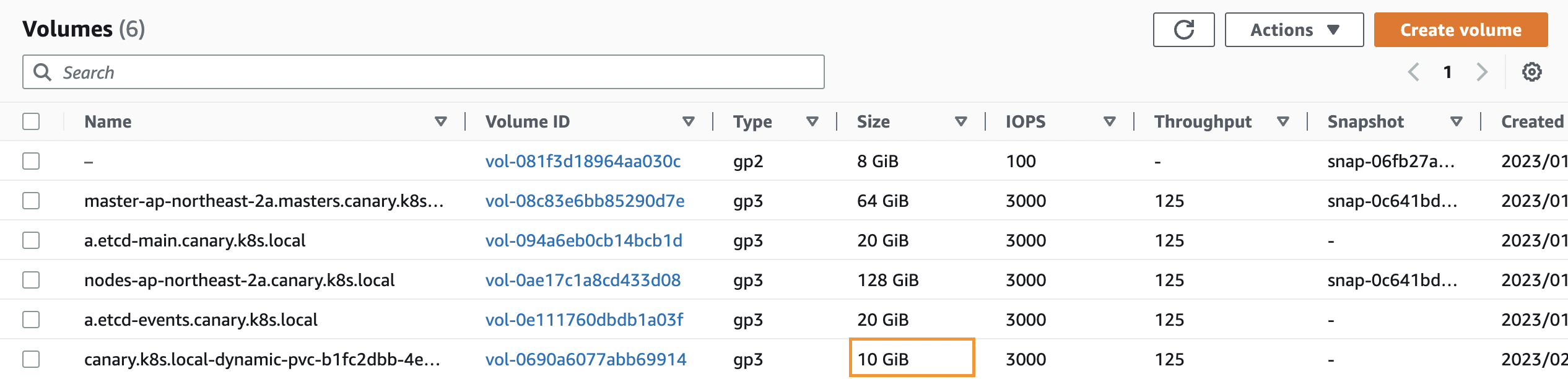
과제 4: AWS Volume Snapshot 실습
kops 클러스터 편집하여 snapshot 기능을 활성화한다.
(canary:default) [root@kops-ec2 ~]# kops edit clustersnapshotController:
enabled: true- certManager는 이미 활성화 되어있음
kops update 명령어를 통해 kOps 클러스터 변경사항을 적용한다.
(canary:default) [root@kops-ec2 ~]# kops update cluster --yes && sleep 3 && kops rolling-update cluster
*********************************************************************************
A new kubernetes version is available: 1.24.10
Upgrading is recommended (try kops upgrade cluster)
More information: https://github.com/kubernetes/kops/blob/master/permalinks/upgrade_k8s.md#1.24.10
*********************************************************************************
W0204 22:42:01.478138 14216 builder.go:231] failed to digest image "602401143452.dkr.ecr.us-west-2.amazonaws.com/amazon-k8s-cni:v1.11.4"
W0204 22:42:01.960047 14216 builder.go:231] failed to digest image "602401143452.dkr.ecr.us-west-2.amazonaws.com/amazon-k8s-cni-init:v1.11.4"
I0204 22:42:07.095945 14216 executor.go:111] Tasks: 0 done / 112 total; 50 can run
I0204 22:42:07.846415 14216 executor.go:111] Tasks: 50 done / 112 total; 19 can run
I0204 22:42:08.984013 14216 executor.go:111] Tasks: 69 done / 112 total; 28 can run
I0204 22:42:09.315591 14216 executor.go:111] Tasks: 97 done / 112 total; 3 can run
I0204 22:42:09.418952 14216 executor.go:111] Tasks: 100 done / 112 total; 6 can run
I0204 22:42:09.694898 14216 executor.go:111] Tasks: 106 done / 112 total; 3 can run
I0204 22:42:09.841383 14216 executor.go:111] Tasks: 109 done / 112 total; 3 can run
I0204 22:42:09.937893 14216 executor.go:111] Tasks: 112 done / 112 total; 0 can run
I0204 22:42:09.998236 14216 update_cluster.go:326] Exporting kubeconfig for cluster
kOps has set your kubectl context to canary.k8s.local
W0204 22:42:10.112816 14216 update_cluster.go:350] Exported kubeconfig with no user authentication; use --admin, --user or --auth-plugin flags with `kops export kubeconfig`
Cluster changes have been applied to the cloud.
Changes may require instances to restart: kops rolling-update cluster
NAME STATUS NEEDUPDATE READY MIN TARGET MAX NODES
master-ap-northeast-2a Ready 0 1 1 1 1 1
nodes-ap-northeast-2a Ready 0 1 1 1 1 1
nodes-ap-northeast-2c Ready 0 0 0 0 0 0
No rolling-update required.(canary:default) [root@kops-ec2 ~]# kubectl get crd | grep volumesnapshot
volumesnapshotclasses.snapshot.storage.k8s.io 2023-02-04T13:42:14Z
volumesnapshotcontents.snapshot.storage.k8s.io 2023-02-04T13:42:14Z
volumesnapshots.snapshot.storage.k8s.io 2023-02-04T13:42:14Zvsclass를 생성한다.
(canary:default) [root@kops-ec2 ~]# kubectl apply -f https://raw.githubusercontent.com/kubernetes-sigs/aws-ebs-csi-driver/master/examples/kubernetes/snapshot/manifests/classes/snapshotclass.yaml
volumesnapshotclass.snapshot.storage.k8s.io/csi-aws-vsc created
(canary:default) [root@kops-ec2 ~]# kubectl get volumesnapshotclass
NAME DRIVER DELETIONPOLICY AGE
csi-aws-vsc ebs.csi.aws.com Delete 2s테스트용 PVC/파드를 생성한다.
- 과제 3에서 생성한 PVC & Pod YAML 파일 활용
cat <<EOF > pvc.yaml
apiVersion: v1
kind: PersistentVolumeClaim
metadata:
name: ebs-claim
spec:
accessModes:
- ReadWriteOnce
resources:
requests:
storage: 4Gi
EOF
cat <<EOF > pvc-pod-app.yaml
apiVersion: v1
kind: Pod
metadata:
  name: app
spec:
  terminationGracePeriodSeconds: 3
  containers:
  - name: app
    image: centos
    command: ["/bin/sh"]
    args: ["-c", "while true; do echo \$(date -u) >> data/out.txt; sleep 5; done"]
    volumeMounts:
    - name: persistent-storage
      mountPath: /data
  volumes:
  - name: persistent-storage
    persistentVolumeClaim:
      claimName: ebs-claim
EOF다음으로 볼륨 스냅샷 파일을 생성한다.
cat <<EOF > ebs-volume-snapshot.yaml
apiVersion: snapshot.storage.k8s.io/v1
kind: VolumeSnapshot
metadata:
  name: ebs-volume-snapshot
spec:
  volumeSnapshotClassName: csi-aws-vsc
  source:
    persistentVolumeClaimName: ebs-claim
EOF
위에서 작성한 파일을 바탕으로 리소스를 생성한다.
k apply -f pvc.yaml
k apply -f pvc-pod-app.yaml
k apply -f ebs-volume-snapshot.yaml
파일 내용 추가 저장된 점을 확인한다.
(canary:default) [root@kops-ec2 ~]# kubectl exec app -- tail -f /data/out.txt
Sat Feb 4 13:52:08 UTC 2023
Sat Feb 4 13:52:13 UTC 2023
Sat Feb 4 13:52:18 UTC 2023
Sat Feb 4 13:52:23 UTC 2023
Sat Feb 4 13:52:28 UTC 2023
Sat Feb 4 13:52:33 UTC 2023
Sat Feb 4 13:52:38 UTC 2023
Sat Feb 4 13:52:43 UTC 2023
스냅샷이 생성된 것을 확인한다.
(canary:default) [root@kops-ec2 ~]# kubectl get volumesnapshot
NAME                  READYTOUSE   SOURCEPVC   SOURCESNAPSHOTCONTENT   RESTORESIZE   SNAPSHOTCLASS   SNAPSHOTCONTENT                                    CREATIONTIME   AGE
ebs-volume-snapshot   true         ebs-claim                           4Gi           csi-aws-vsc     snapcontent-61aa7ff3-cc5e-443a-9150-864da6e0625b   38s            38s
(canary:default) [root@kops-ec2 ~]# kubectl get volumesnapshot ebs-volume-snapshot -o jsonpath={.status.boundVolumeSnapshotContentName}
snapcontent-61aa7ff3-cc5e-443a-9150-864da6e0625bEBS 스냅샷을 확인한다.

앱과 pvc를 제거하여 강제로 장애를 재현해본다.
(canary:default) [root@kops-ec2 ~]# kubectl delete pod app && kubectl delete pvc ebs-claim
pod "app" deleted
persistentvolumeclaim "ebs-claim" deleted
콘솔에서도 볼륨이 제거된 것을 확인할 수 있다.

위에서 생성한 스냅샷으로 복원해보자.
- 복원을 위한 PVC & Pod 를 작성한다.
cat <<EOF > ebs-snapshot-restore-claim.yaml apiVersion: v1 kind: PersistentVolumeClaim metadata: name: ebs-snapshot-restore-claim spec: accessModes: - ReadWriteOnce resources: requests: storage: 4Gi dataSource: name: ebs-volume-snapshot kind: VolumeSnapshot apiGroup: snapshot.storage.k8s.io EOF cat <<EOF > pvc-pod-app-restore.yaml apiVersion: v1 kind: Pod metadata: name: app spec: terminationGracePeriodSeconds: 3 containers: - name: app image: centos command: ["/bin/sh"] args: ["-c", "while true; do echo \$(date -u) >> data/out.txt; sleep 5; done"] volumeMounts: - name: persistent-storage mountPath: /data volumes: - name: persistent-storage persistentVolumeClaim: claimName: ebs-snapshot-restore-claim EOF
위에서 작성한 파일로 리소스를 생성한다.
k apply -f ebs-snapshot-restore-claim.yaml
k apply -f pvc-pod-app-restore.yaml
PVC가 재생성 된 것을 확인한다.
(canary:default) [root@kops-ec2 ~]# k get pvc,pv
NAME                                               STATUS   VOLUME                                     CAPACITY   ACCESS MODES   STORAGECLASS    AGE
persistentvolumeclaim/ebs-snapshot-restore-claim   Bound    pvc-724b64b6-7670-46c1-a056-0adb0051da8e   4Gi        RWO            kops-csi-1-21   61s

NAME                                                        CAPACITY   ACCESS MODES   RECLAIM POLICY   STATUS   CLAIM                                STORAGECLASS    REASON   AGE
persistentvolume/pvc-724b64b6-7670-46c1-a056-0adb0051da8e   4Gi        RWO            Delete           Bound    default/ebs-snapshot-restore-claim   kops-csi-1-21            18s
파드 삭제 전까지의 저장 기록 및 파드 재생성 후 기록이 저장되고 있는 것을 확인할 수 있다.
(canary:default) [root@kops-ec2 ~]# kubectl exec app -- cat /data/out.txt
Sat Feb 4 13:52:08 UTC 2023
Sat Feb 4 13:52:13 UTC 2023
Sat Feb 4 13:52:18 UTC 2023
Sat Feb 4 13:52:23 UTC 2023
Sat Feb 4 13:52:28 UTC 2023
Sat Feb 4 13:52:33 UTC 2023
Sat Feb 4 13:52:38 UTC 2023
Sat Feb 4 13:52:43 UTC 2023
Sat Feb 4 14:00:38 UTC 2023
Sat Feb 4 14:00:43 UTC 2023
Sat Feb 4 14:00:48 UTC 2023
Sat Feb 4 14:00:53 UTC 2023
Sat Feb 4 14:00:58 UTC 2023
Sat Feb 4 14:01:03 UTC 2023
Sat Feb 4 14:01:08 UTC 2023
Sat Feb 4 14:01:13 UTC 2023'DevOps' 카테고리의 다른 글
| 불변 인프라(Immutable Infrastructure)와 Snowflake란 (0) | 2024.11.01 |
|---|---|
| [AWS]AWS CLI를 이용해 현재 접속 계정(IAM User/Role) ARN 가져오기 (0) | 2023.09.25 |
| PKOS 스터디 2주차: 쿠버네티스 네트워크 (0) | 2023.01.29 |
| vyos 라우터 사용법 / 인터페이스에 설정된 IP 삭제 방법 (1) | 2023.01.21 |
| 리눅스(Linux) 다중 명령어(;, &&, ||) (0) | 2023.01.13 |